
Howdy and Happy Holidays!
I promised you some instructions so that you can launch your websites and get some visits and feedback from your family and friends over the break.
FTP Setup
There are several ways to get your site live by publishing your files via FTP. You can use the Dreamweaver FTP capability or another FTP tool (e.g. FileZilla [download it here]). You can also FTP via Internet Explorer browser. Following are tutorial videos that demonstrate Dreamweaver and Internet Explorer.
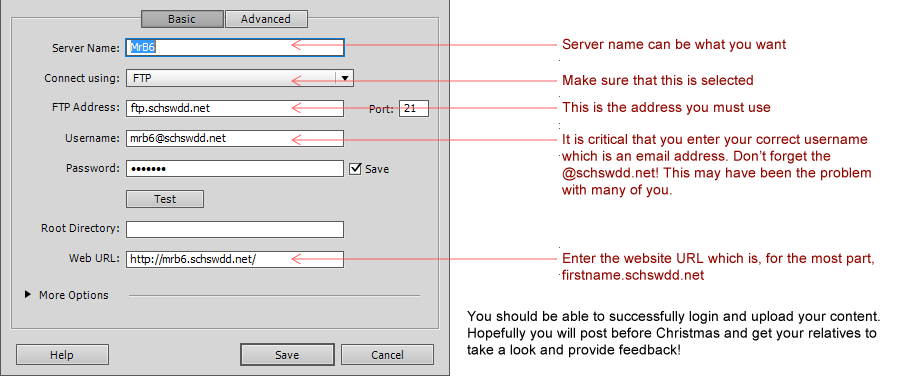
The keys to succes is making sure that your settings are correct and to put the files to the correct place on the server so that you can see them from the web.
Here is a screen shot of the proper settings:
FTP Using Dreamweaver
Note: The following is a slightly older version of Dreamweaver but no difference in how FTP works.
FTP Using Internet Explorer
Here is how to use Internet Explorer / Windows Explorer to ftp your site:
FTP Old Skool (Command Line)
Here's how to use the Command Line to upload your site. Note, the video shows you how to do it, but remember to use your access settings:
Root Problem
Help! I uploaded my site, but I'm still getting the JustHost webpage. The root of your problem is that you have not put your files, particulalry your index.htm file in the root of the site. Below are some helps to resolve your problem.